Write to support
You write to the Restoman team from the dashboard and follow your questions and their answers in My questions.
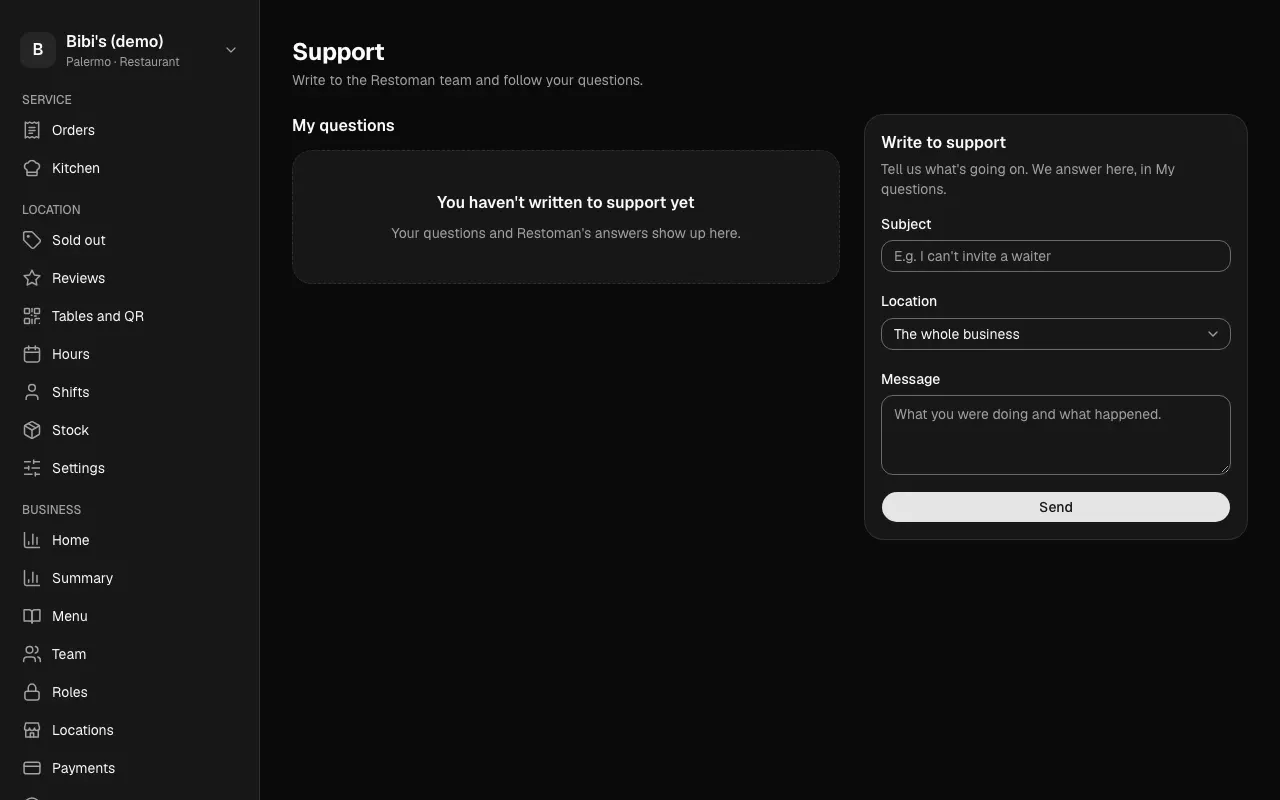
When something isn't working or you have a question, you write to the Restoman team without leaving the dashboard. It opens from Support, at the bottom of the sidebar, under Help (on a phone, in the navigation menu).
Who can: the owner and the admins. They can write even while the business is suspended.
Write a question
- Under Write to support, give it a short Subject, for example "I can't invite a waiter".
- If the business has more than one location and the question is about one of them, choose it under Location. Otherwise, leave The whole business.
- Under Message, say what you were doing and what happened.
- Tap Send. The question opens, with your message.
My questions
My questions lists the business's questions, newest first, with their status:
- Waiting on support: it's Restoman's turn to answer.
- Answered: Restoman answered you. Open it to read the answer.
- Resolved: the Restoman team marked it done.
Tap a question to see every message. Restoman's answers carry the name of whoever answered you, for example "Sofía (Restoman)". To keep the conversation going, write under Your reply and tap Reply: the question goes back to Waiting on support, even if it was resolved.
Writing, replying and Restoman's answers are recorded in the business's activity. Answering a question gives the Restoman team no access to your business: to go in and help you they need support access, which you also see in the activity.